
Download Android Lollipop 5.1.1 firmware for M8S TV Box
This firmware is for M8S TV Box with Amlogic S812 CPU
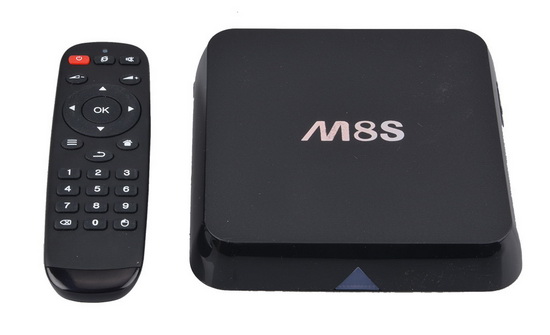
Download latest Android Lollipop 5.1.1 stock firmware for M8S TV Box from here or here. Download previous firmware from here. Download latest Android KitKat 4.4.2 stock firmware for M8S TV Box from here.
Firmware details
Archive: 2bbb6-m8s-firmware-5.11-twrp
Model: M8S TV Box
Image file size: 535 MB
Platform: Amlogic S812
Image: 5.1.1ota.zip
Build number: Android/n200C/n200C:5.1.1/LMY47V/20160721:user/test-keys
Inside archive: firmware + recovery.img
Flash steps
Download this zip file it will have all you need and copy it to an sd card, then pop your sd card into your box put a pin in the reset hole and wait untill the TEAMWIN logo appears. After that click install and click on the zip file. click install and wait… then click reboot box and you should now have android 5.1.1 on your m8s ap3660 box!
Caution: Please do not update firmware unless you know what you are doing, you really want it or it is absolutely necessary. Firmware updates may occasionally have bad results, like bricking your device, temporarily or permanently. The firmware update process is done entirely at your own risk. Before attempting to update the firmware, back up your data.
Did this article help you? If so, please tell me in a comment what do you think about it.

















Alguém já testou essa firmware no M8S bcm4335?
would like to upgrade my m8s box
Não funcionou no meu m8s bcm4335 🙁
I have working versions of 5.1.1 for AP6330, BCM4335 you can join ghostware.org or head to my facebook group, M10, Mx3, T8 versions etc. https://www.facebook.com/groups/Ghostware/
I have tryed it and it does not work for my M8S tv box
On my WJ-M8S it seemed to work and loaded up… but now wifi seems stuck and remote control functions seem to be not working.
Hi – Looking for 5.1.1 for Dark ‘EvoBox’ 4k UltraHD Arm Cortex A9 s812 – is the M8S box the same, certainly looks like it from the outside. Will the firmware for this box run on the Dark EvoBox?
Thanks
Looking for firmware for m8s with n200 812 NOT n200c
Did install this rom on my device M8S ap6330 CS 812M8 V1.3 20150921
Install was perfect boot once and there was a working 5.1 rom with ethernet
Only if i reboot my device its bricked. red licht only recover whith USB burning tool
Can someone help me with this
The ROM worked perfectly on my Leelbox M8s. My box was listed as a n200 and I verified it had the ap6330 wifi chip.
Only downside is the ROM is not rooted.
Works on M8S with kca-003 chipset, used twrp n200 version because the included version had a too big screensize on my TV.
Root with kingoroot.
Have tried installing this firmware but keep getting ‘E signature failed aborted installation, please help
This firmware doesn’t work. i get the same error as Nigel and it aborts the installation.
would this work on ro.build.fingerprint=MBX/bcm4335/bcm4335:4.4.2/M8S.BCM4335/20160407:user/test-keys
Mine went though the installation I have the same model as Jeff WJ-M8S, but upon reboot just boots to black screen and nothing else. Has blue light on front and that is it. Please suggest what else can be done.
so we all know that android kitkat with kodi is pretty much dead in the water so i decided today to do some digging.
i found a site called chinagadgets. i found a lollipop firmware.
didnt work.
anyways
ive FINALLY cracked it turns out the matricom q boxes are the same as m8s so we now FINALLY Have a working rom with LAN for our boxes and its LOLLIPOP 5.1.1 the link https://www.dropbox.com/sh/ucsl1gwn3…-01-2016)?dl=0
Can you please resend Danny’s dropbox link because it is incomplete.
Hello Danny, can you provide a link from where you took the firmware that worked with your m8s, the one you listed is not working now. Can someone else confirm that matricom q firmware works for m8s?
Hello 🙂
https://www.dropbox.com/sh/ucsl1gwn3jjogfj/AAAjqdV4j9p-2RK17MMDQ99Da/GBOX%20Q%20%202.1.1%20(03-01-2016)?dl=0
here is ok for ms8 clone 20150418
tuto : for sd 🙂
Voila donc mettre ces 3 fichiers sur sd + bouton reset + power = 5.1.1
Try my restore M8S AP6330 . For others don’t know. Maybe can. Just try.
1.) http://199.175.53.21/M8S_AndroidTV5.1.1_ROM.zip – M8S Android TV MOD
2.) http://199.175.53.21/M8S_Standart5.1.1_ROM.zip – M8S 5.1.1 Standart ROM
Im re-build and re-mod from Ghostware build. Thanks to Ghostware team.
can you help me nothing will play
mio personale
after upgrade process my remote is not working. Any idea how to fix that? Everything else works fine. I upgraded from 4.4.2 to 5.1.1.
Thanks, Randy
@highpoiss Did you ever got your box working. I have a similar box.
M8S AndroidTV Mod
after restore, it only recognizes 1GB of RAM and not 2GB of RAM,
Any solution?
The firmware was installed through the update and works on the M8C S812 ap6330(killed by firmware for m8s bcm4335), but without a camera(it is not critical). All drivers for Bluetooth,Wi-Fi, Etnernet workers, excellent build, thanks.
wheres the reset pin> i dont see one.. so useless info.
Caleria: in the audio jack
GREAT, But not try install only on 4.4.1 FW ROM!
*If you try install on 4.4.1 recovery.img (TWRP) you can and install is success 🙂
BUT if you try install ROM 5.1.1ota.zip on 4.4.1 you got “brick” at start system nothing boot and still red LED and you must one more install stock ROM 4.4.1.img with PC and USB-A/USB-A and use program USB_Burning_Tool for unbrick and burn amlogic 4.4.1.img STOC ROM.