
Download latest Android Lollipop 5.1.1 stock firmware for Sunvell T95 TV Box
This firmware is for Sunvell T95 TV Box 2GB RAM with AMLogic S905 CPU
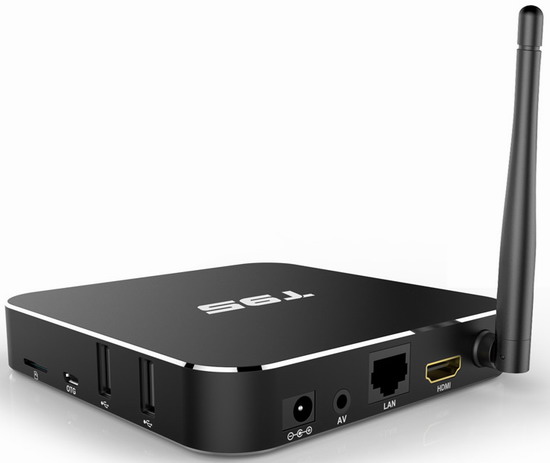
Download latest Android Lollipop 5.1.1 stock firmware for Sunvell T95 TV Box 2GB RAM version from here, here or here. Download 1GB firmware from here.
Firmware details
Archive name: T95-2G20160303
Image: aml_upgrade_package.img
Archive file size: 680 MB
Platform: AMLogic S905
Inside archive: firmware + u-boot.bin.sd.bin + aml_sdc_burn.ini
Caution Please do not update firmware unless you know what you are doing, you really want it or it is absolutely necessary. Firmware updates may occasionally have bad results, like bricking your device, temporarily or permanently. The firmware update process is done entirely at your own risk. Before attempting to update the firmware, back up your data.
Did this article help you? If so, please tell me in a comment what do you think about it.
Don’t miss any of our future video tutorials, follow us on Youtube. Like us on Facebook. Add us in your circles on Google+. Watch our photo albums on Flickr.
















Hello!!! After flashing TV box T95, the device shows when loading the boot, without connecting to the laptop TV box OTG cable, the device does not work on the TV shows “NO SIGNAL”. Please help. Sincerely Sergei Tsarev. Russia.
Здравствуйте!!! После перепрошивки TV box T95, устройство показывает при загрузке boot, без подключения к ноутбуку TV box кабелем OTG, устройство не работает, на телевизоре показывает “НЕТ СИГНАЛА”. Прошу помощи. С уважением Сергей Царев. Россия.
@Sergey
I have rom T95-2G20160309 and is works for me. I got it from the seller after i brick me T95. Now works
email me at preda.daniel@yahoo.com
Hello, with the help of Dan, i can share the firmware, tools, root and documentation for the T95-2G.
Here are the links :
https://www.dropbox.com/s/lgtwifxvjy1c63h/T95-2G-0309.zip?dl=0
https://www.dropbox.com/s/fhyh7ehanqdhtg0/Amlogic%20Tools.zip?dl=0
https://www.dropbox.com/s/9mes9x43gsguz8r/S905_ez_root.zip?dl=0
Hope that Helps !
Regards,
Very nice. Could you provide any instructions on how to flash my T95 without a PC. I only own mac devices and I cannot find a hard reset pin.
Any help is much appreciated
So update…
Long story short, I foolishly tried to update by selecting the firmware from within the Update and Backup.
Now I have a device that has power but does nothing.
Holding in the reset for up to 30 seconds doesn’t do anything. Nothing comes on screen for me.
I am now going to breakdown the above instructions to noob level as I bricked mine and unbricked it with the above method.
Step 1: Download the firmware and unzip it somewhere easy to remember.
https://www.dropbox.com/s/lgtwifxvjy1c63h/T95-2G-0309.zip?dl=0
Step 2: Download Amlogic Tools to create the bootable microsd as follows:
https://www.dropbox.com/s/fhyh7ehanqdhtg0/Amlogic%20Tools.zip?dl=0
a) in drop down select microsd
b) check the box to format
c) Select the uboot file from the extracted firmware
d) Start the format, it will pop-up for formatting, just click on and let it finish. When finished close the windows.
e) Now you have a bootable microsd, you need to add the files, simple add the 3 files that were extracted from the firmware to the root of the SD Card. End of Step 2.
3. Insert microsd into T95, power off and unplug power from back of the box.
Using a toothpick or paper click depress the button located in the audio port, you will know you are pressing it if you listen closely.
4. With the button depressed plug in the power cable, ensuring you keep that button pressed. Keep pressed until the recovery image start and then you can stop holding it.
Once the recovery starts it will complete all on it’s own.
*Note* My box froze after the boot sequence, I powered off and powered on and it finished and loaded back into box.
Congrats you are hopefully back up and running.
5. Now for rooting:
a) You should remove your microsd at this point and just format it.
b) Download the ez root files.
https://www.dropbox.com/s/9mes9x43gsguz8r/S905_ez_root.zip?dl=0
c) Unzip the files and put them all into the microsd.
d) Insert the card back into T95 and go to Updates & Backup
e) Click on select and locate the ezroot.zip file and click update.
Your box will reboot and update the system with the root.
Once your system is back on, you are now rooted. Enjoy
I hope that my instructions made this process more clear for some unable to find something cut and dry.
It is worth noting that you must run this tool in windows.
I used windows xp on a virtual machine to get the job done.
Justin, please help my with “in drop down select microsd” – what program do I start?
This: USB_Burning_Tool? I can’t see drop down
Ok, I found the solution here:
http://chinagadgetsreviews.com/how-to-unbrick-any-amlogic-devices-create-an-bootable-magic-micro-sd-card-in-minutes.html
With Amlogic BootcardMaker.
How did you make out Rysiek
Justin, will those files work for the 1 gb version? I would very much like to root it.
Thanx
After flash this rom in pc. I can‘t find kodi and kodi update in my T95 . And some build in application also missing. Can anyone help me . Althould i download back form playstore,the kodi also miss some function as b4
****Update for the Firmware
Hello, i’ve got a new firmware from Dan, image is bigger and different :
Here is the new links :
https://www.dropbox.com/s/ptf1zncdu8oh1zd/T95-2G.zip?dl=0
https://www.dropbox.com/s/fhyh7ehanqdhtg0/Amlogic%20Tools.zip?dl=0
https://www.dropbox.com/s/9mes9x43gsguz8r/S905_ez_root.zip?dl=0
It seems to be the same Android version but with different applications and Kodi is in final version (16).
Old link to the firmware is removed (no space left on my dropbox).
Tristan, thanks for the files and help. Although, trying to update using the micro sd ended up in a fast brick. For those who experience the same try this…
1. Download the files provided by Tristan
FW – https://www.dropbox.com/s/ptf1zncdu8oh1zd/T95-2G.zip?dl=0
Tools – https://www.dropbox.com/s/fhyh7ehanqdhtg0/Amlogic%20Tools.zip?dl=0
2. Extract both ZIP files to their own folder
3. In the Tools folder there is another folder for the
USB_Burning_Tool. Go into that folder and run the setup
4. Connect your T95 using a micro usb cable and the OTG port
5. Open the USB Burning Tool you installed
(With the USB Burning Tool program open, follow these steps…)
(The T95 device should be shown in the list, if not then you didn’t install the drivers when the USB Burning Tool asked during its install)
6. Open the “File” menu at the top and select “Import Image” and select the “aml_upgrade_package.img” from the extracted firmware folder
7. Click :”Start” (without changing any of the checked options, leave them as they are)
8. Just wait for the install to finish and your done.
Mine failed the first attempt at 4%. I just hit “Start” again and it went through the second time. Took about 6 minutes.
I have the 1GB T95 box and have updated it to the latest firmware from this site.. If I try to connect with WIFI, it just tells me that my password is incorrect, but I KNOW it IS correct. This happened in the earlier firmware as well..
In the Ethernet settings, I can select Static, and enter all the ip info, but when it returns back to the status area, it still shows as being DHCP..
When I try to set up my VPN, if I type the routing addresses that my VPN uses, the SAVE option fades out and is not clickable.
Can something be done to fix these issues?
this is my first Android TV box…it appears to have been made late on a Friday afternoon.. Not impressed
If I click on the word “here” for the 1GB version of the software at the top of this page, I get this…
Firmware details
Archive name: T95-1G-20160106
Image: aml_upgrade_package.img
Archive file size: 685 MB
Platform: AMLogic S905
Inside archive: firmware + u-boot.bin.sd.bin + aml_sdc_burn.ini
yet, if I navigate from the Firmwares link in the menu on the top, and go to page 2, I get this… which is obviously newer. Your links need to be updated…
Firmware details
Archive name: T95-1G-20160426
Image: aml_upgrade_package.img
Archive file size: 611 MB
Platform: AMLogic S905
Inside archive: firmware + aml_sdc_burn.ini
Thx for the posts. Anybody have any tools (preferably linux) to examine/unpack/mount these amlogic .img files?
Hello, is there a new firmware for Sunvell T95 Max?
We switched Internet providers from AT&T to time Warner cable. Now try to connect to Internet is says password invalid. Cannot connect….help?
hey guys just wondering if anyone else has had their unit soft bricked by the card method? I tried the usb method first but refuses to see the T95 2G yes the drivers installed. just doesnt show up at all in the usb tool. so i followed the steps for the card method and it booted into recovery for like 1 second and the black screened. Now when i power up theres no imput to the TV and I can not get into recovery. Nothing from the card method and nothing from the usb method. Any ideas?
**Update**
I missed the bin file, its not in the archive. Everything Boots and runs great, Netflix worked as before until I powered off the unit. Which puts me back to square one. Anyone know how to fix this? I have tried several firmwares and still none of them let Netflix work after reboot. The sunvell website does even show this unit.
***UPDATED TO SOLVED***
found a firmware that works. Some Apps were updated but everything worked when updated including Netflix and You-tube. Kodi was not in there after I flashed the firmware but the links were in place on the desktop, just installed it and everything was cool. Here the link to the firmware. Thanks to Vid on Freaktab for sharing.
https://mega.nz/#F!RY8gFKBB!usJBSe1IQttGmrsSdkMCXw
Does anyone have a fix for this same ethernet issue for the T95max?
I have t95n android box, but I put a password in, now I can’t remember the password, can anybody help me please?
Des
Good evening
Look for your firmwares
t95max 2g/32
Hello, is there a firmware for Sunvell T95 Max?