Best Deal Alert! You can now buy Meross MSL430HK Smart LED Ambient Lamp from or Shop.meross.com for only $31.99. Use our exclusive coupon code chinagadgets10 to get 10% Off on your order! Hurry up, limited time offer!
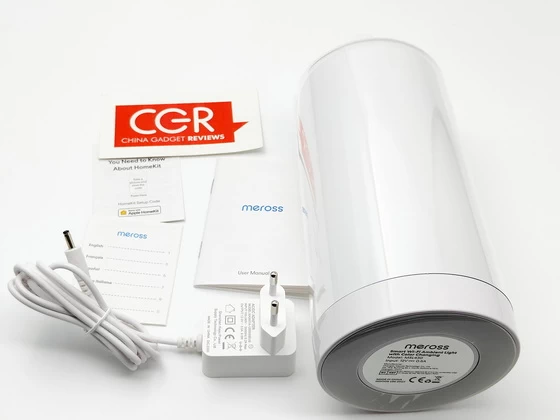
Meet Meross MSL430HK
The lamp looks like a tube with rounded corners, of small dimensions in a satin white color that makes it elegant even when switched off; since it is an object that can be adapted to any environment, the design choice is certainly a winner.
On the top we have a on / off button which, pressed once and briefly, turns on the light while with the operating lamp, if pressed twice turns off the light, pressed briefly changes its color or effect and finally, by long pressing, it allows us to change the brightness up to the desired intensity. The pairing between app and device is very simple, as usual: just connect the smartphone or tablet to the domestic wi-fi and select the type of product to connect to. The application will do everything automatically and in a few steps the pairing will be complete. In addition to the app, the Meross MSL430HK Smart Ambient Light it is controllable through the various voice assistants; in fact, after coupling, it is fully compatible with Alexa, Siri through Apple HomeKit And Google Assistant.
Performance of the Meross Smart WiFi Ambient Light has been quite good since I began testing, with no instances of “No Response” in HomeKit or lack of availability through the Meross app. Just like with other Meross Wi-Fi accessories, the lamp responds to commands almost instantly, which is really nice compared to slower Bluetooth devices. Colors on-device are par for the course for smart lighting, with white looking crisp, reds and blues looking rich and vivid, and shades of green and yellow lacking when it comes to darker shades. The light inside the diffuser is distributed well; although you can tell that the actual source is situated at the bottom, I actually like the smooth gradient-like effect that it gives off. The lamp is truly an accent piece, best-suited for a table, desk, or nightstand, and depending on other lighting conditions in your home, it may not be bright enough for task lighting.
The Meross Smart WiFi Ambient Light makes for an excellent table-top accent lamp with millions of colors and brightness controls, all at a price around $30.
Meross MSL430HK Highlights
Elegant design, perfect bedside companion.
Control your smart ambient light from anywhere anytime with the Meross app.
Works with Homekit, Amazon Alexa, Google Assistant, SmartThings.
Adjust brightness, tune light appearance, and set from multiple RGB colors.
Works with the Wi-Fi you already have. No hub required.
Meross MSL430HK Main Features
– Touch Control: Touch control on the top of the smart lamp to light the lamp ON or OFF, change colors and adjust brightness.
– Voice Control: Apple HomeKit, Siri, Amazon Alexa, and Google Assistant compatibility let you control your lamp absolutely hands-free with simple voice commands.
– Remote Control: Via Meross App or Apple Home App, you can remote control the smart lamp from anywhere anytime with internet access. (Note: only support 2.4GHz Wi-Fi.)
– Schedule and Timer: Create schedules, timers, or countdowns to turn on/off your lamp automatically based on your routines.
– Best Companion: 2700-6500K tunable white, 16 million colors, adjust your bedside lamp from 1% to 100% brightness, choose from cool energizing lights, warm relaxing lights, night lights, and colorful mood lights to suit different occasions.
Meross MSL430HK Specs
Brand: Meross
Model: MSL430HK
Type: Smart Wi-Fi Ambient Light
Input: 12V / 0.5A
Dimmable: Yes
Tunnable: Yes, 2700~6500K
RGB: Yes
Dimensions (W x D x H): 10.0 x 10.0 x 19.5 cm or 3.9 x 3.9 x 7.7 in.
Antenna: One internal antenna
Wireless Standards: IEEE 802.11 b/g/n, 2.4GHz, 1T1R
Wireless Security: Support 64/128 bit WEP, WPA-PSK/WPA2-PSK
Certifications: FCC, CE, RoHS, WEEE
System Requirements: Smartphone running iOS 13 or later, Android 6.0 or later & Existing Wi-Fi network
Firmware version: updated to v4.2.6 from v4.2.3
EAN: 6973696560483
Operating Temperature: 0°C~40°C (32°F~104°F)
Storage Temperature: -40°C~70°C (-40°F~158°F)
Operating Humidity: 10%~90% non-condensing
Storage Humidity: 5%~90% non-condensing
Color: White
HomeKit Setup tips
– If you are setting up HomeKit device, please connect your smartphone or tablet to a 2.4 GHz Wi-Fi network and disable your VPN, if any. Ensure that your Wi-Fi is using WPA3/WPA2 since WPA3 only will lead to setup failure.
– Make sure your smart device is covered by strong Wi-Fi signal, which is not a hidden Wi-Fi name (SSID). A hidden Wi-Fi name (SSID) might not work when setting up.
– Meross HomeKit smart devices support iOS 13/ iPadOS 13 or later. It is recommended that you upgrade your iOS or iPadOS to the latest version before pairing with the smart device.(iOS only. Android users needs Android 6.0 or later)
– Upgrade the Meross app to the latest version and make sure you granted access permissions, such as location and local network, asked by the Meross app.
– Launch the Meross app and log in to your account, or if you are a new user, tap Sign up to create a new account.
– Relocation of the smart device does not require additional operations provided that it remains on the same network with strong Wi-Fi signal.
– If this is not the first time you’ve added this smart device, you’ll have to reset it before going any further.
– Deny Meross app to access Precise Loation and Local Network will lead to setup failure.
– If you have multiple Wi-Fi in your house, we recommend you to leave only one Wi-Fi on when you set up HomeKit. iPhone may connect to A Wi-Fi when initiating the HomeKit setup while end up with connecting to B Wi-Fi. The key is that this will lead to Homekit setup failure for sure since HomeKit requires iPhone to connect to the same Wi-Fi during the whole process.
Meross Android application
Meross app can help you set up and manage meross smart bulb, smart plug, smart switch, smart garage door opener, smart thermostat, and so on. Install the Meross app on your Android smartphone and add the HomeKit device as adding a regular Meross smart device. Then link your Meross account within Amazon Alexa or Google Assistant. If you want to use HomeKit after setup on Android. Just launch your Apple Home app on your iPhone and scan or input the setup code printed on the device or user manual. No reset or extra configuration is needed.
With meross app, you can:
1. Turn on and off your devices remotely from anywhere with internet.
2. Set schedules and scenes for your devices so that they can run automatically as you wish.
3. Link your devices to your voice assistant platform.
4. Check and update your devices to the latest firmware.
Download Meross Android application latest version 3.22.0 for free from Google Play Store.
Package Content
1 x Meross MSL430HK Ambient Light
1 x Power adapter model KA0601A-1200500EUS
1 x Multi-language User Manual (EN / DE / IT / ES / FR)
1 x HomeKit Setup Guide
1 x EU Declaration of Conformity (EN / FR / ES / IT / DE / NL)
Photo gallery full album here. Official webpage here. Read more here about Meross products.
About Meross. Creativity is thinking up new things; innovation is doing new things. Meross, founded in 2016 by a group of experts from leading companies such as Microsoft, Cisco, MediaTek, and TP-Link, is replete with both first-class creativity and cutting-edge innovation. At Meross, we create products that empower people’s lives. We believe in making homes smarter and people’s lives easier. We believe everyone deserves a smart life, and it should be simple, smart, and stable. Meross has strong research and development capabilities, excellent operating experiences and solid partnerships with pertinent players in the industry, resulting in bountiful financial support and escalated profit growth. Today, the company has expanded with its tentacles spread across millions of customers from over 20 countries and regions. The company has an assortment of top-tier gadgets, including smart plugs, smart bulbs, smart switches, smart surge protectors, smart garage door openers, and smart radiator thermostats. Meross products are compatible with Apple HomeKit, Amazon Alexa, Google Assistant, SmartThings.
Did this article help you? If so, please tell me in a comment what do you think about it.
Don’t miss any of our future video tutorials, follow us on Youtube. Like us on Facebook. Join our Best Deals Telegram Channel. Join our Android TV Box Firmware Updates Telegram Channel. Subscribe now to our newsletter.