Best Deal Alert! You can buy Ticktime TK3 Pomodoro Timer Cube Pro from Amazon US / Amazon DE / Amazon UK / Mercadolivre-Brazil / Official page for a very good price. Hurry up, limited time offer!
Meet Ticktime TK3 Pomodoro Timer Cube Pro – A More Tangible Way to Stay Focused
There is a familiar trap in using a smartphone to stay productive: I pick it up to do one useful thing, and suddenly there are several other things competing for my attention. Setting a timer should be a straightforward decision, yet it can become another reason to check messages, revisit an email, or scroll through notifications. That is what makes the Ticktime TK3 Pomodoro Timer Cube Pro interesting to me. It gives time management a physical presence on the desk, with a simple proposition: choose a task, set a boundary, and get started. As someone whose work revolves around gadgets, articles, product photography, and an inbox that rarely stays quiet, I appreciate tools that make everyday routines easier to manage. The TK3 brings together automatic Pomodoro sessions, quick countdowns, a stopwatch, a desk clock, and daily alarms. What appeals to me most, however, is the way those functions are built around a small object I can deliberately turn, position, and leave beside my work.
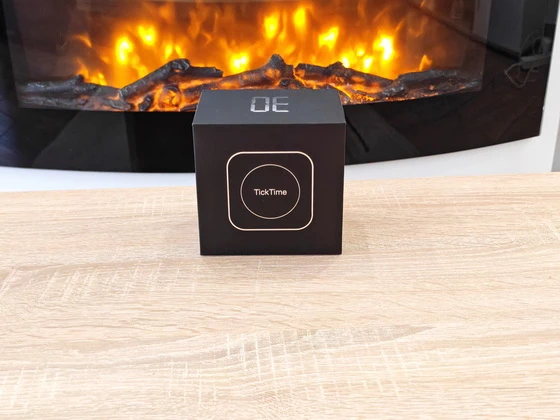
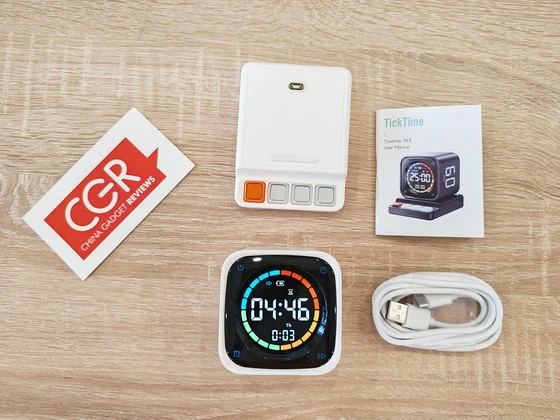
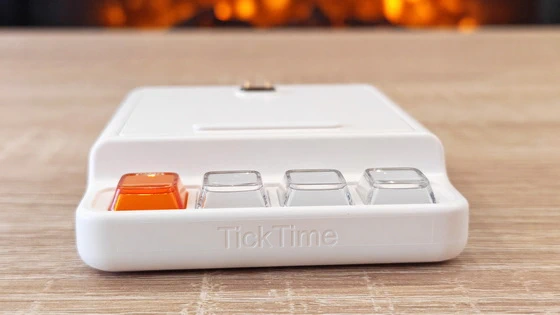
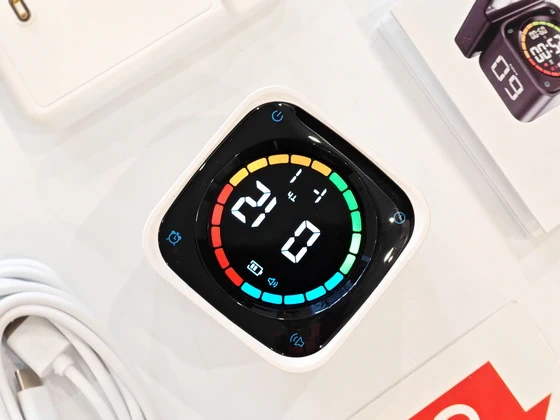
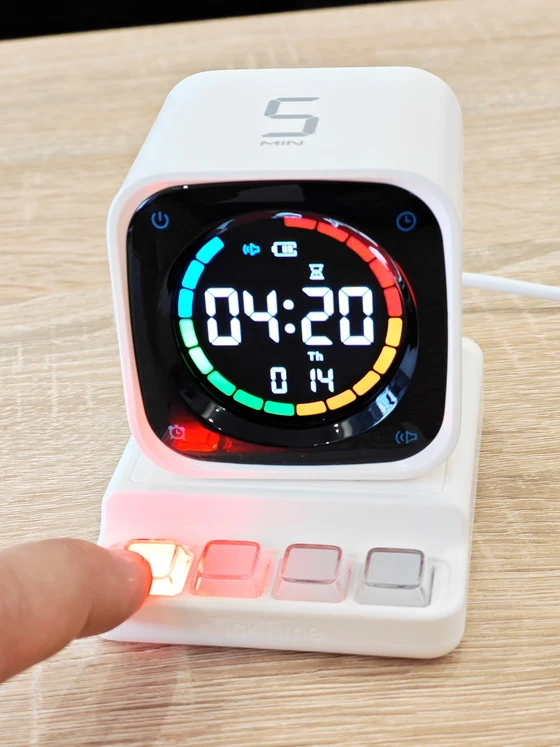
The unboxing suits that practical approach. Alongside the white timer, the supplied set includes a matching base, a USB-A to USB-C charging cable, and a user manual. I appreciate having the base as part of the presentation because it gives the timer a dedicated place on the desk. The whole package has the character of a small desktop accessory, something intended to become part of a working environment rather than disappear into a drawer between uses. nThis is also one of those products where I would keep the manual close during the initial setup. Starting a preset countdown is straightforward, but the TK3 has enough additional functions to justify learning its controls properly. Understanding the distinction between the clock, alarms, custom timing, and Pomodoro operation makes more sense than assuming every function works through the same flip gesture.
The compact proportions suit the way this product is meant to be handled. At a quoted weight of approximately 0.4 lb, or around 181 g, it is portable enough to move between workspaces. For me, that matters more than making it exceptionally thin or adding decorative materials. This is an object designed to be picked up and turned repeatedly, so its rounded shape and clearly marked timing faces serve a practical purpose. I also appreciate the self-contained format. A focus timer should be easy to position beside a notebook, move closer to a keyboard, or take to another room. The TK3’s rechargeable design supports that flexibility, allowing it to function independently of a permanent power connection. Its construction and dimensions are geared toward everyday desktop use, although long-term durability is something that requires more than an initial assessment.
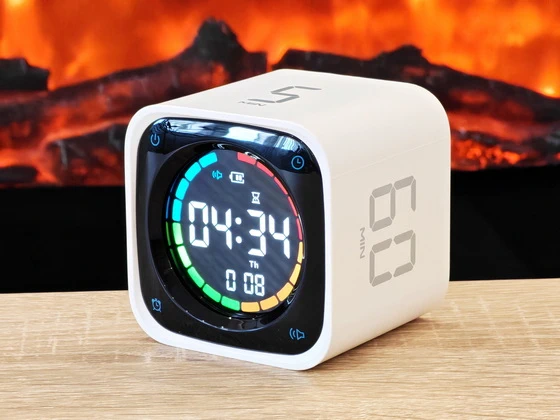
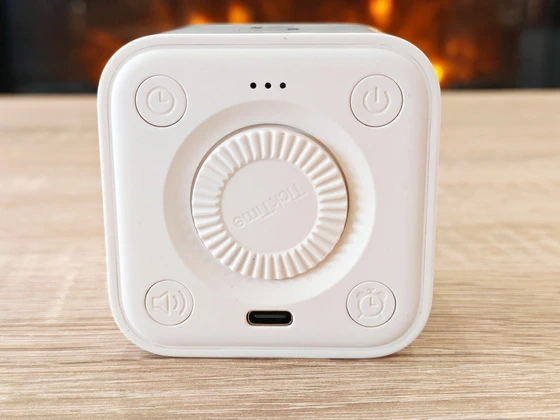
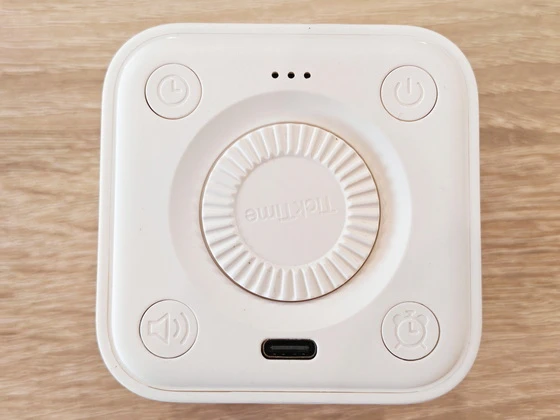
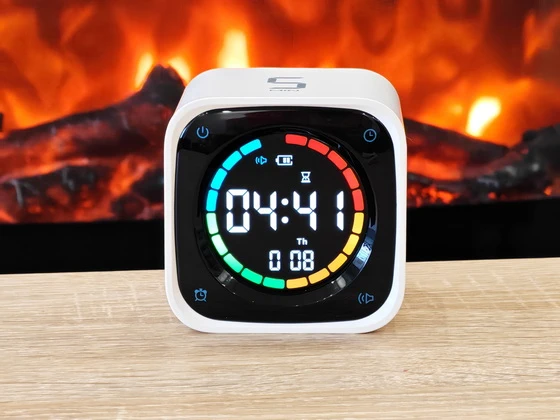
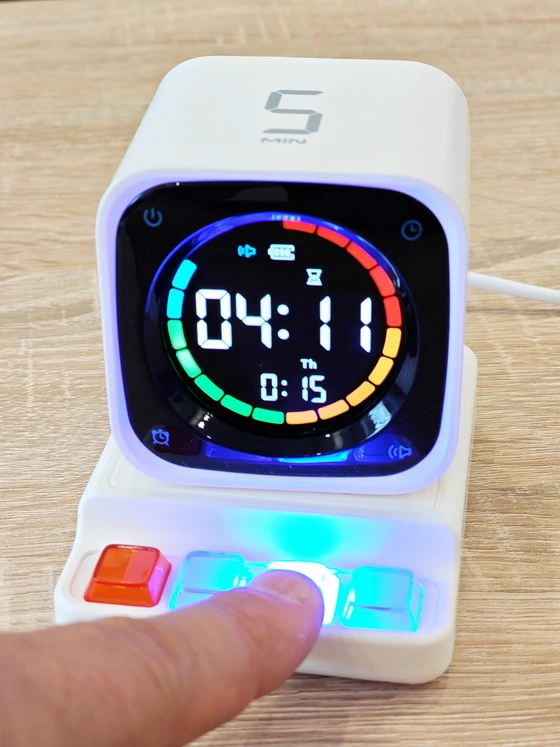
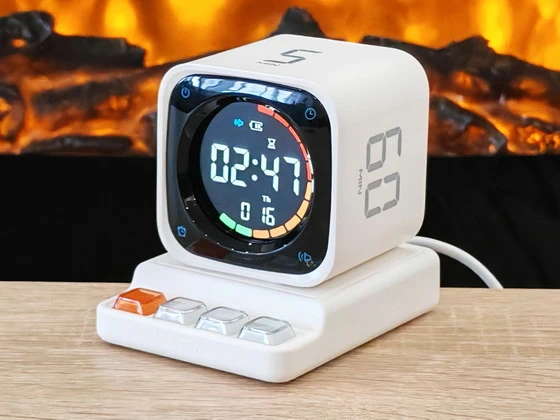
Visually, I like the balance between the rounded white body and the glossy black front. The coloured segments around the central display give it personality without requiring a large footprint, while the prominent digits keep the timer itself at the centre of the design. It has a slightly playful appearance that feels appropriate for a device meant to make work sessions more approachable. I can see it fitting comfortably beside a laptop, keyboard, or notebook without making the desk feel crowded. I do have one reservation about the interface. The power, clock, volume, and alarm icons surrounding the display look like potential touch controls, but they are only visual references for the four physical buttons on the back. I like the intention: once their positions are familiar, the front markings help locate the rear controls. Still, I would prefer that distinction to be immediately obvious. Anyone expecting a touchscreen could initially mistake the printed symbols for buttons.
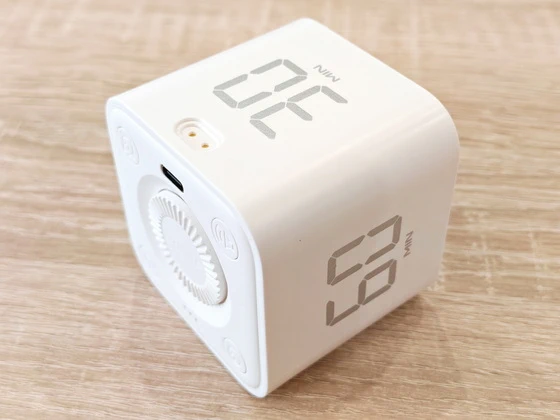
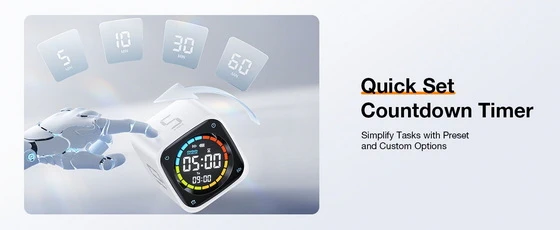
The flip-to-start countdown is the feature that best explains the TK3’s appeal. Its gyroscope detects the selected orientation and starts one of four preset intervals: 5, 10, 30, or 60 minutes. That gives the timer a direct relationship between movement and action. Instead of entering a duration every time, I can choose a familiar block of time through a simple physical gesture. For my kind of workflow, those intervals make sense. I would use five minutes for a short reset between tasks, ten minutes to put a limit on email, thirty minutes for a focused writing session, and sixty minutes for a larger piece of editing or preparation. The useful part is having a clear starting point and a defined stopping point. A task such as “work on the next review” can feel open-ended; giving it thirty minutes makes the commitment more concrete. That physical interaction is what distinguishes this product from another timer window on a computer. I like the idea of placing a visible boundary beside the keyboard before beginning a task. The remaining time has its own dedicated display, so checking it does not require changing windows or reaching for a phone. The TK3 cannot decide what deserves my attention, but it provides a straightforward way to make that decision actionable.
The automatic Pomodoro function adds more structure. The TK3 combines 25-minute work periods with five-minute breaks and runs four cycles automatically. I consider that more useful than a single 25-minute shortcut because it carries the routine forward without requiring a fresh countdown at every transition. For writing and editorial work, I can see the attraction immediately. A focused interval creates room to concentrate on one part of an article, while the scheduled break provides an opportunity to step away before moving into the next session. I particularly appreciate that the break is built into the sequence. When there is always another paragraph to improve or another message to answer, a stopping cue can be just as valuable as a starting cue. I would still treat Pomodoro as an option rather than a rule for every task. Some work benefits from a longer uninterrupted stretch, and some jobs only need a few minutes. Having alternative timing modes alongside the automatic sequence gives the TK3 room to accommodate those differences.
The custom countdown offers durations from one second to 99 minutes and 59 seconds. That flexibility makes the device more useful beyond its four numbered presets and the standard 25/5 routine. I can see the benefit when a task needs a specific time allowance, whether that means rehearsing a presentation, setting aside a short editing session, or timing something away from the desk. The maximum duration is worth keeping in mind. Just under 100 minutes is ample for many desk tasks, study sessions, and short activities, but it does place a limit on individual countdowns. If I wanted to time an uninterrupted session lasting several hours, I would need a different approach. Within its intended role as a focus timer, though, the range is sensible. The stopwatch offers a different perspective on time management. Instead of deciding how long a task should take, it lets me measure how long it actually takes, with an elapsed-time range up to 99 minutes and 59 seconds. I find that distinction useful. Preparing a product for photography, selecting images, or formatting an article can sound like a quick job until the elapsed time tells a different story. The supported pause-and-resume functionality is another practical addition. Interruptions are part of a working day, and I appreciate having the option to preserve a timing session when something needs immediate attention. For elapsed-time tracking in particular, pausing can help distinguish time spent doing the task from time spent dealing with everything around it.
Alert options deserve attention because they influence whether a timer fits comfortably into a shared space. The TK3 offers sound, silent flashing, and vibration for countdown notifications. My preference would depend on the activity: a visual alert is appealing while recording content or working quietly, while an audible notification makes more sense when I might be looking away from the desk. Vibration adds another choice, although I would not automatically assume it will be inaudible on every surface. A vibrating device can transmit some sound through a hard tabletop. What I appreciate is the flexibility to choose an alert that suits the situation, instead of having every completed session announced in exactly the same way.
Outside active timing, the TK3 also serves as a desk clock, displaying the time, day, and date. I like that it retains a useful role between work sessions. A dedicated clock is a modest feature, but it reinforces the reason to leave the device within reach: it remains relevant even when a countdown is not running. There are also three daily alarms for recurring reminders. I can see myself assigning those to a few clear points in the day, such as starting a focused work period, taking lunch, and finishing desk work. These alarms are separate from countdown alerts, an important distinction when configuring the device. I would check the alarm settings independently rather than assume that choosing a silent countdown also determines how scheduled reminders behave.
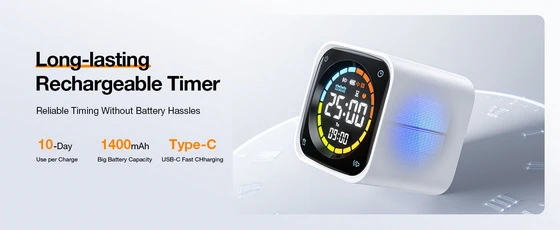
Battery life is another area where the TK3’s approach makes sense for a portable desk accessory. It has a 1,400mAh rechargeable battery and charges through USB-C, with Ticktime advertising up to ten days of use per charge. I would treat that figure as the manufacturer’s estimate rather than a measured result from this review. Actual endurance will depend on how the timer is used, including display activity and alert behaviour. What I appreciate most is the combination of a rechargeable battery and a familiar connector. It avoids the need to keep replacement disposable batteries nearby, and it allows the timer to move around without remaining attached to a cable. I would not infer a particular charging speed from USB-C alone, but the connector is a practical choice for a modern desktop device.
My overall impression of the Ticktime TK3 Pomodoro Timer Cube Pro is positive because its features support a coherent purpose. The flip presets make short sessions accessible, the automatic Pomodoro sequence provides structure, and the custom countdown and stopwatch leave room for different working styles. The clock and alarms give it a useful presence beyond focused work. There are details I would want buyers to understand before choosing it: the front icons are not touch controls, the more advanced functions require some familiarisation, individual timing sessions top out at 99 minutes and 59 seconds, and the advertised battery endurance is not a guarantee for every usage pattern. Those are meaningful considerations, but they do not undermine the appeal of the core design. For me, the TK3’s strongest quality is that it makes the decision to focus feel tangible. I can assign a task a specific amount of time and keep that commitment visible beside my work. For writers, students, creators, and anyone who likes a physical cue to begin and end a session, that is a compelling role for a small desktop gadget. The Ticktime TK3 gives a familiar productivity technique an accessible, practical form—and that is precisely why it interests me.
⭐ Our Rating: 9.5/10 – Highly Recommended!
Ticktime TK3 Pomodoro Timer Cube Pro Main Features
– True Pomodoro Timer for Better Focus: Built-in 25-minute work and 5-minute break presets help you follow classic Pomodoro cycles with ease. The Ticktime TK3 runs 4 cycles automatically, keeping your workflow structured and efficient. A simple, reliable way to stay focused without relying on apps or phones
– Quick Flip Countdown with Gyroscope: Start timing instantly by flipping to preset intervals of 5, 10, 30, or 60 minutes—no buttons or setup needed. The motion-activated design is intuitive for all ages, making it great for kids, seniors, and anyone who prefers hands-on, distraction-free time management
– Custom Countdown & Flexible Modes: Need a specific timing length? TK3 lets you set a custom countdown from 1s to 99m 59s, giving you flexible control over work sessions, breaks, and task durations. Adapt your timing routine to different activities and improve productivity with a more structured workflow
– Count-Up Stopwatch Mode: Track elapsed time with stopwatch mode from 1s to 99m 59s. Ideal for games, workouts, speedcubing, presentations, and other activities that require time tracking, helping you better understand how you spend your time
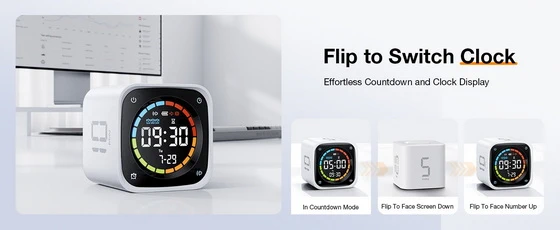
– Desk Clock Mode with Clear LED Display: Flip to activate clock mode and view time, day, and date on a bright, easy-to-read LED screen. Its clear visibility makes it a practical desk companion for home offices, classrooms, study rooms, and shared workspaces when not used as a timer
– Triple Alarms & Flexible Countdown Alerts: Set up to three daily alarms to support routines such as wake-up times, study breaks, meals, or bedtime. Alarm reminders are separate from countdown alerts—you can choose sound, silent flash, or gentle vibration to fit quiet environments like offices or libraries
– The four button icons printed around the display (power, clock, volume, and alarm) are visual guides only and do not have touch functions. They indicate the positions of the four physical buttons on the back, allowing you to operate the timer easily without frequently flipping between the front and back
– Pause & Resume with a Flip. Need to take a break during countdown? Just flip the timer screen-up to pause, and flip again to resume. A truly intuitive and responsive focus timer that fits seamlessly into your workflow
– Rechargeable, Portable & User-Friendly: A built-in 1400mAh battery lasts up to 10 days per charge and recharges via USB-C—no disposable batteries required. Weighing just 0.4 lbs and measuring 2.6 inches, this compact timer is easy to take anywhere, ideal for travel, school, or office use.
Ticktime TK3 Pomodoro Timer Cube Pro Highlights
– Flip-to-start presets for 5, 10, 30, or 60 minutes
– Four automatic Pomodoro cycles with 25-minute focus sessions and 5-minute breaks
– Custom countdown and stopwatch modes up to 99 minutes 59 seconds
– Flip to pause and resume the countdown
– Sound, vibration, or silent flashing alerts
– LED desk clock with day, date, and three daily alarms
– USB-C charging and up to 10 days of battery life per charge
– Compact 2.6-inch design weighing approximately 181 g.
Real-life scenarios where Ticktime TK3 Pomodoro Timer Cube Pro can be quite useful
– Writing an article — Draft for 25 minutes, then stretch during the automatic 5-minute Pomodoro break.
– Studying in a library — Set a 30-minute revision session and choose a silent flashing alert.
– Managing email — Flip to 10 minutes to answer priority messages before returning to your main task.
– Editing a video — Use the 60-minute preset for a first cut. If interrupted, turn the cube screen-up to pause.
– Rehearsing a presentation — Use the stopwatch to check whether your talk fits its allotted time.
– Filming an unboxing — Keep a custom countdown beside the camera and use the silent flash as your cue to wrap up.
– Cooking pasta — Set a custom countdown for the exact cooking time and choose an audible alert.
– Helping with homework — Give a child a visible 10-minute countdown for practising multiplication tables.
– Taking a movement break — Set a daily alarm to remind you to get up from your desk and take a walk.
– Doing a home workout — Time a plank with the stopwatch and record how long you hold it.
– Playing board games — Set a one-minute countdown to give each player equal time for a turn.
– Tidying up — Flip to 5 minutes and see how much of your desk you can clear before the timer ends.
Ticktime TK3 Pomodoro Timer Cube Pro Specs
Brand: TickTime
Model Name: Cube
Model number: TK3
Type: Digital Timer
Design: Rounded cube with four numbered sides and gyroscope-based flip-to-start control
Color: White body with a glossy black display face
Size: Approximately 2.6 in (6.6 cm) across
Weight: Approximately 0.4 lb (181 g)
Display: Digital LED display with a four-color countdown ring, large timer digits, and indicators for battery level, alarms, and alert mode
Countdown presets: 5, 10, 30, and 60 minutes. Turn the desired number face up to start
Custom countdown range: 1 second to 99 minutes 59 seconds
Stopwatch range: Counts up to 99 minutes 59 seconds
Pomodoro mode: Four automatic cycles, each with 25 minutes of focus and a 5-minute break
Pause and resume: Turn the display face up to pause a countdown, then flip the cube again to resume
Desk clock: Displays the time, day of the week, and date
Daily alarms: Three independently configurable alarms
Countdown alerts: Sound, silent flashing, or vibration
Physical controls: Rear rotary dial and four buttons for clock, power, volume, and alarm settings. Matching front icons indicate the button positions
Battery: Built-in 1,400 mAh rechargeable battery
Rated battery life: Up to 10 days per charge
Charging port: Rear USB-C port
Package Content
1 x Ticktime TK3 Pomodoro Timer Cube Pro
1 x Matching desk base with four buttons
1 x USB-A to USB-C charging cable
1 x User manual
1 x Packaging Box
Photo gallery full album here. Official page here.
Did this article help you? If so, please tell me in a comment what do you think about it.
Don’t miss any of our future video tutorials, follow us on Youtube. Like us on Facebook. Join our Best Deals Telegram Channel. Join our Android TV Box Firmware Updates Telegram Channel. Subscribe now to our newsletter. If you need Tech Reviewer or Youtube Influencer read this. Donate now here to support CGR Team!